
Table of Contents
Linux VPS vs Windows VPS are two types of virtual server hosting solutions that offer distinct operating systems (OS) and environments. Here’s a comparison between Linux VPS and Windows VPS across various aspects:
Linux VPS:
Linux VPS provides a better level of performance and can be customized to your purposes. It can handle high-traffic websites with ease. And because Linux is an open-source OS, it is an affordable option for bloggers and small organizations. And since it can handle high traffic, it still remains a good option for any medium or large-sized business or organization.
Linux VPS can be a Proxy, Webserver, File server, Cloud server, Mail server, DNS server, Game Server, Penetration Testing, Firewall, and Transferring large files to a computer.
Overall, using a proxy server in VPS hosting can provide added security and privacy benefits, and choosing the right operating system for your needs is important in achieving optimal performance and functionality.
Windows VPS:
Windows VPS can be a good choice for large businesses because of its reliability and flexibility. Windows server provides sub-features allowing the user to work in any field. It can also be a good option if you are already familiar with Windows OS and want to avoid switching to Linux OS. One of the biggest benefits of using a Windows VPS is its ease of use; you don’t need a lot of tech knowledge to use it, which you may need while using a Linux VPS.
You can easily use Windows VPS if you have a basic understanding of computers and computer networks. Windows VPS has a GUI (Graphical User Interface), making it easy to use.
There are different versions of Windows, such as Windows 2012, Windows 2019, etc. It is recommended to use more popular versions like Windows 2019. Different versions of Windows servers include Windows NT 3.1 Advanced Server 1993, Windows NT 3.5 Server 1994, Windows NT Server 3.51 1995, Windows NT 4.0 1996, Windows Server 2000, Windows Server 2003, Windows Server 2003 R2 2005, Windows Server 2008, Windows Server 2003 R2 2009, Windows Server 2012, and Windows Server 2016.
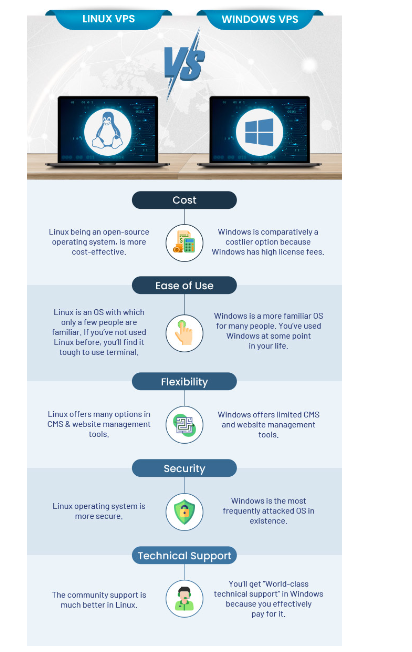
Comparision of Linux VPS vs Windows VPS
Operating System:
- Linux VPS: Runs on the Linux operating system, which includes distributions such as Ubuntu, CentOS, Debian, and Fedora. Linux is open-source and offers a wide range of distributions tailored to different use cases.
- Windows VPS: Runs on the Windows Server operating system, which provides compatibility with Microsoft technologies and software applications. Windows VPS offers support for ASP.NET, Microsoft SQL Server, and other Windows-specific technologies.
Cost:
- Linux VPS: Generally, Linux VPS hosting tends to be more cost-effective than Windows VPS hosting. Linux distributions are typically open-source and free to use, which can result in lower licensing costs for hosting providers and users.
- Windows VPS: Windows VPS hosting often comes with additional licensing fees due to the proprietary nature of the Windows operating system. As a result, Windows VPS hosting plans may be priced higher compared to Linux VPS plans.
Application Compatibility:
- Linux VPS: Well-suited for hosting a wide range of web applications, content management systems (CMS), and development environments. Linux supports popular technologies such as PHP, MySQL, Apache, Nginx, and Python.
- Windows VPS: Ideal for hosting applications and services that are specifically designed for the Windows platform. Windows VPS offers compatibility with ASP.NET, Microsoft SQL Server, Exchange Server, SharePoint, and other Microsoft technologies.
Development Environment:
- Linux VPS: Preferred by developers and system administrators who are familiar with the Linux command line interface (CLI) and open-source development tools. Linux offers extensive customization options and access to a vast repository of software packages and libraries.
- Windows VPS: Suitable for developers working with Microsoft technologies and tools, such as Visual Studio, .NET framework, PowerShell, and Microsoft Azure. Windows VPS provides an integrated development environment (IDE) for building and deploying Windows applications.
Security and Stability:
- Linux VPS: Known for its stability, security, and reliability. Linux distributions benefit from a robust security model, regular security updates, and a large community of developers contributing to the ongoing improvement of the OS.
- Windows VPS: Windows Server offers strong security features, including built-in firewall, user access controls, and security patches. However, Windows VPS may be more susceptible to malware and security vulnerabilities compared to Linux VPS due to its widespread usage and proprietary nature.
Management and Administration:
- Linux VPS: Administrators typically manage Linux VPS using the command line interface (CLI) and SSH (Secure Shell) for remote access. Linux VPS offers extensive customization options and control over server configurations.
- Windows VPS: Administrators can manage Windows VPS using remote desktop protocol (RDP) or Windows Remote Management (WinRM). Windows VPS provides a graphical user interface (GUI) for system administration tasks, making it more accessible to users familiar with the Windows environment.
Which Should You Use – Windows VPS Or Linux VPS?
Among Linux VPS vs Windows VPS, which would be a better choice?
We’ve discussed every important aspect, and it depends on the user. If the user has previous knowledge of using Windows and wants to avoid switching to Linux, they can opt for Windows VPS. But remember, it will be costlier, less secure, and less flexible. If you are comfortable with that, there’s no problem; go for Windows VPS.
But, if you want an affordable, more secure, more flexible VPS with robust support. You can choose Linux VPS.
Conclusion:
In summary, the choice between Linux VPS vs Windows VPS depends on factors such as cost, application requirements, development preferences, and familiarity with the operating system. Linux VPS is often preferred for its cost-effectiveness, flexibility, and compatibility with a wide range of applications, while Windows VPS is suitable for users who require specific Microsoft technologies and development environments.